
Train Virtual Assistants for LinkedIn & Twitter Management
Delegate y Without Losing Your Voice
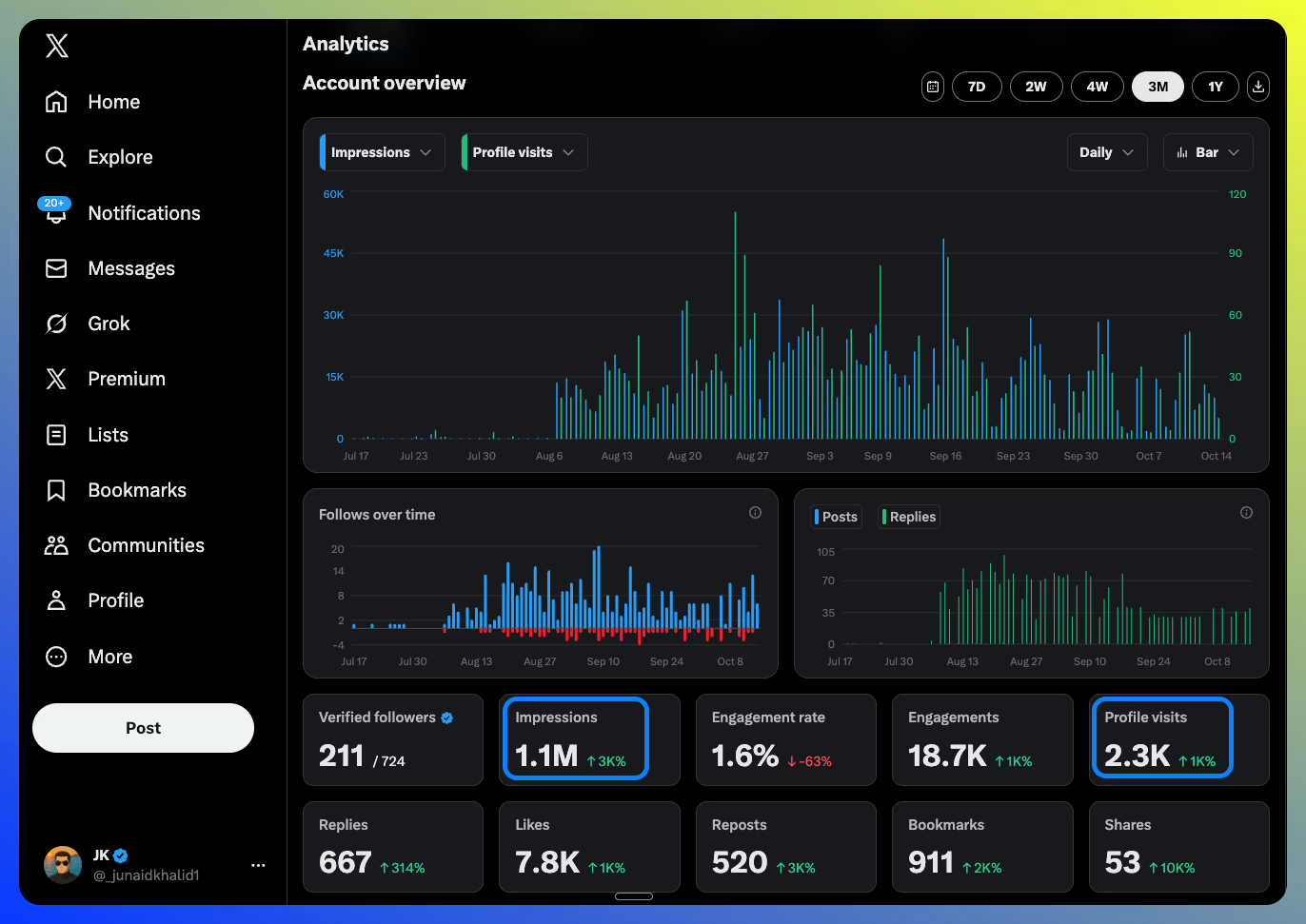
The exact 3-iteration training system that generated 1M+ impressions and 2K+ profile views in 60 days. Includes spreadsheet templates, Loom recording guide, and daily operation scripts.
Quick Overview: How This System Works
Watch this 7-minute overview to understand the complete VA training system before diving into the detailed guide below.
VA Training System Overview
Understand the full system
See what to expect
Save time with context
Your 30-Minute Setup
Quick setup steps for founders, agency owners, and account managers. Complete these before bringing in your VA.
What This Guide Delivers
A marketing system that you can outsource to your VA to get at least 100K+ impressionsy 1000s of profile views per month from LinkedIn and Twitter.
But, you will need to spend anywhere from 2 to 6 hours initially to train them. This guide will show you exactly how.
Expected Timeline
- Semana 1: Set up and train VA on Twitter (easier, faster)
- Semanas 1-4: VA goes live & makes 50-100 replies/day, submits weekly reports
- Week 5 & onwards: Review performance & Consider LinkedIn commenting (if comfortable with credential sharing)
Why This Works
LigoSocial does 80-90% of the work: Creates authentic comments in your voice based on your experiences
Your VA handles the remaining 10-20%: Acts as human-in-the-loop, selecting and refining comments
Economics: VA hourly rate ($5-40/hr) vs. your hourly rate ($200-5000/hr)
Scale: VA can do 50-200 replies/day consistently; you can't (otherwise you wouldn't be here!)
Delega a tu VA
Hand off these sections to your virtual assistant. They'll handle training, daily operations, and reporting.
⭐ Most Critical Section
Your job is 80% done. Now you need to run a "pilot" with your VA - and provide them actionable feedback. If you want the highest possible quality, do this pilot run very carefully and diligently.
6.1 Training Spreadsheet Setup
📋 Get Your Training Spreadsheet
We've created a ready-to-use Google Sheet template with instructions and an example row to guide your VA.
- Open the Training Spreadsheet Template
- Clic File → Make a copy
- Rename it to something like "VA Training - [Your Name]"
- Share it with your VA (give them Edit access)
💡 Tip: The spreadsheet includes instructions in Column F and an example in Row 2 showing your VA exactly how to fill it out.
| Column A | Column B | Column C | Column D |
|---|---|---|---|
| Tweet/Post URL | Original Content of the post/tweet | Suggested Reply/Comment | Feedback (from you) |
What Goes in Each Column:
- Column A: Direct link to the tweet/post being replied to
- Column B: Text content of the original post (for context)
- Column C: The reply your VA suggests (after using LigoSocial and any edits they made)
- Column D: Your feedback on their suggested reply
6.2 Iteration 1: The 50-Reply Calibration
Instructions to Your VA:
"Complete this training exercise before going live:
- Open Twitter and filter the 'Primary Engagement Targets' list
- Find 50 tweets posted in the last 24 hours that have 10+ replies already
- For each tweet:
- Use LigoSocial Chrome extension to generate 3 reply options
- Pick the best reply (or make your own version if none fit)
- DO NOT POST THE REPLY
- Log it in the training spreadsheet
- Goal: Complete 50 logged replies
- Notify me when done"
Your Review Process (20 minutes):
- Go through all 50 replies
- Mark in RED any replies that don't sit well with you
- In Column D (Feedback), note specifically:
- Words/phrases you'd never use
- Tone issues (too formal/casual/salesy)
- Structural issues (how you'd have started differently)
- Missing context or depth
Expected Outcome:
- ✓ 15-20 replies will need feedback (normal)
- ⚠️ If more than 25 need feedback, your LigoSocial custom styles need refinement first
Example Feedback:
REPLY:
"This is a great point about email segmentation! We've seen similar results with our clients."
YOUR FEEDBACK:
"I don't use exclamation marks much. Also, I'd share a specific number instead of 'similar results' - be more precise. Try: 'This tracks with what we've seen. Last quarter, 8 clients testing segmentation saw 34% higher open rates. The primary reason i think was matching segment size to content specificity.'"
6.3 Iteration 2: The 25-Reply Refinement
Instructions to Your VA:
"Review the feedback from Iteration 1. Pay special attention to:
- Specific words/phrases flagged
- Tone adjustments needed
- How I structure my replies differently
In the same Google Sheet, create a new subsheet with the same structure and repeat the same process with 25 more replies:
- Use LigoSocial to generate options
- Apply the feedback learnings before selecting/editing
- Log in the spreadsheet
- DO NOT POST yet
- Send me the sheet for review"
Your Review Process (30 minutes):
- Gol: 20+ of 25 replies should be perfect
- ✓ If 20+ are good → proceed to Iteration 3
- ⚠️ If fewer than 20 are good → provide feedback and repeat with 25 more
6.4 Iteration 3: The 10-Reply Go/No-Go
Instructions to Your VA:
"This is the final calibration. Complete 10 more replies with all previous learnings applied. If these pass review, you'll be cleared to go live."
Your Review Process (15 minutes):
- Gol: 9-10 of 10 replies should be perfect
- ✓ If achieved → VA is cleared for daily operations
- ⚠️ If not → one more round of 10 with specific feedback
6.5 Why This Process Works
Beneficios:
- ✓ Low risk (no publishing during training)
- ✓ Fast feedback loops (VA learns your voice quickly)
- ✓ Documented learnings (VA can refer back to spreadsheet)
- ✓ Confidence building (both you and VA)
- ✓ Quality assurance (prevents brand damage from poor comments)
Inversión de tiempo:
- Your time: 1 hour total across all iterations
- VA time: Less than 2 hours total (paid learning)
- Payoff: 6-12 months of hands-off operation
Preguntas frecuentes
Q: What if my VA doesn't have experience with Twitter/LinkedIn?
That's fine. The training process teaches them what they need to know. Look for strong writing skills and attention to detail more than platform experience.
Q: How do I know if my VA is posting quality comments?
The 3-iteration training process ensures quality before they go live. After that, weekly reports show engagement rates (replies to your replies, profile visits). If engagement drops, review a sample of recent comments.
Q: Can I use this for multiple accounts?
Yes. Once you have one VA trained, you can scale to multiple accounts (your personal + your clients if you're an agency). Each account needs its own LigoSocial custom styles and 1-week calibration period.
Q: I don't have a VA yet. Where can I hire one?
You can hire VAs from platforms like Upwork o Fiverr. Look for VAs with strong writing skills and attention to detail. Platform experience is less important than writing ability since this guide teaches them the process.
Q: How much should I pay my VA?
VA rates typically range from $4 to $40 per hour depending on location, experience, and where you hire from (check Upwork y Fiverr for current rates). Most people spend between $150 to $600 per month depending on the time commitment required. For reference, if you contract for 10 hrs/week; you can expect them to do 1500 to 2500 comments/month. generate 500-2,000 quality replies per month.
Q: Can I use this for languages other than English?
Yes, LigoSocial supports 100+ languages. The training process works the same way. Make sure your VA is fluent in the target language.
Recursos relacionados
Real Results & Case Studies
Learn from actual growth experiments using the commenting strategy
I got 500K+ impressions on Twitter/X in 4 weeks with this strategy
Complete breakdown of the exact commenting strategy that generated 500K+ impressions, 1,200+ profile views, and 40+ paid subscribers from a 300-follower account.
Por qué los comentarios de LinkedIn son más importantes que las publicaciones (y cómo aprovecharlos en 2025)
The article that went viral with 14,000+ engagements. Learn why strategic commenting outperforms posting and how to implement it effectively on LinkedIn.
💡 These articles share the real-world testing and results behind the strategies in this guide