
Truco para la búsqueda de empleo en LinkedIn: Cómo ver los empleos antes que los demás
If you're job hunting on LinkedIn, you're probably making the same mistake everyone else makes.
You search for your job title. "Product Manager." "Software Engineer." "Marketing Director."
Vas revisando los resultados. Solicitas a algunos. Vuelve mañana y hazlo otra vez.
Aquí está el problema: solo ves una fracción de los trabajos que realmente se ajustan a tus habilidades.
The same role has five different names depending on the company. A "Frontend Developer" at one company is a "UI Engineer" at another, a "Web Developer" at a third, and a "JavaScript Specialist" at a fourth. They're all the same job. But if you only search "Frontend Developer," you miss the other 80%.
Mientras tanto, todos los demás también buscan "Frontend Developer". Esos anuncios reciben cientos de solicitudes. ¿La lista de "Ingeniero de UI"? Quizá una docena.
You're competing in a crowded pool while ignoring the empty lanes.
I'm going to show you how to fix this with two strategies:
- The Portfolio Approach - Save multiple job search variations to cover the entire market
- The URL Hack - Modify LinkedIn's URL to see jobs posted in the last hour, not the last 24
Combinados, te dan una ventaja sistemática sobre todos los demás que buscan las palabras clave obvias y lo revisan una vez al día.
Let's get into it.
Why Searching One Job Title Is Costing You Opportunities
Job titles are chaos.
There's no standardization. Every company invents their own naming conventions. HR teams use whatever sounds good. Founders title roles based on vibes.
The result: identical jobs get posted under completely different names.
A few examples:
The same engineering role might be called:
- Frontend Developer
- Frontend Engineer
- Desarrollador de interfaz de usuario
- UI Engineer
- Desarrollador web
- Desarrollador de JavaScript
- React Developer
- Client-Side Engineer
The same product role might be called:
- Product Manager
- Propietario de producto
- Program Manager
- Gestor Técnico de Producto
- Product Lead
- Product Analyst
El mismo rol de marketing podría llamarse:
- Marketing Manager
- Growth Manager
- Demand Generation Manager
- Digital Marketing Manager
- Performance Marketing Manager
- Acquisition Manager
If you search one term, you miss the others. It's that simple.
And here's why this matters beyond just volume:
Less competition on non-obvious titles. Everyone searches the standard keyword. "Product Manager" gets flooded with applicants. "Program Manager" at the same company, doing the same work? Way fewer applications.
Smaller companies use weird titles.Especialmente las startups. Podrían llamar al puesto "Jefe de Producto Material" o "Líder de Crecimiento" o algo completamente inventado. Estos trabajos existen. Solo tienes que buscar creativamente para encontrarlos.
Recruiters don't always optimize for search.No todos los reclutadores conocen SEO. Publican ofertas de empleo con el título interno, no con el título que buscan los candidatos. Su pérdida es tu ganancia, si sabes buscar.
The fix isn't to search five different terms every morning. That's exhausting. The fix is to save all five searches once and check them with one click each.
La estrategia de la "cartera de apuestas"
Think about this like an investor thinks about diversification.
Si pones todo tu dinero en una sola acción, estás expuesto a un gran riesgo. Si ese stock se desploma, estás acabado. Los inversores inteligentes reparten las apuestas entre múltiples posiciones.
Job searching works the same way.
If you only search one job title, you're betting everything on that keyword. If the market is slow for "Product Manager" listings this week, you see nothing. Meanwhile, "Product Owner" listings are popping up and you have no idea.
The Portfolio Approach means:
- Identify all the title variations for your target role (aim for 4-6)
- Create a separate LinkedIn job search for each variation
- Save each search in LinkedIn Lists
- Check all of them systematically
You're not searching harder. You're searching smarter. Five saved lists, five clicks, complete market coverage.
No more typing the same searches every day. No more forgetting to check that alternate title you thought of last week. No more leaving jobs on the table because you didn't think to search "UI Engineer."
Las búsquedas se salvan. El trabajo se hace una vez. Ahora solo tienes que ejecutar.
Cómo construir tu portafolio de búsqueda de empleo
Let me walk through exactly how to set this up.
Step 1: Brainstorm All Title Variations
Before you touch LinkedIn, make a list. Write down every possible title someone might use for the role you want.
How to brainstorm:
- Mira los portales de empleo y apunta a los diferentes títulos para puestos similares
- Consulta los perfiles de LinkedIn de las personas que hacen el trabajo que quieres: ¿cuál es su título?
- Pregunta a ChatGPT: "¿Cuáles son todos los diferentes títulos de trabajo para [tu puesto objetivo]?"
- Think about seniority variations (Manager vs. Senior Manager vs. Director)
- Think about industry-specific terms (some industries have their own vocabulary)
Aim for 4-6 solid variations. More than that becomes hard to manage. Fewer means you're probably missing something.
Step 2: Create Separate Job Searches on LinkedIn
Ve a LinkedIn Jobs y haz tu primera búsqueda.
Introduce tu primera variación de título en el campo de palabras clave. Luego añade los otros filtros:
- Location (or Remote)
- Experience level
- Fecha de publicación
- Company size
- Industria
Whatever matters to you.
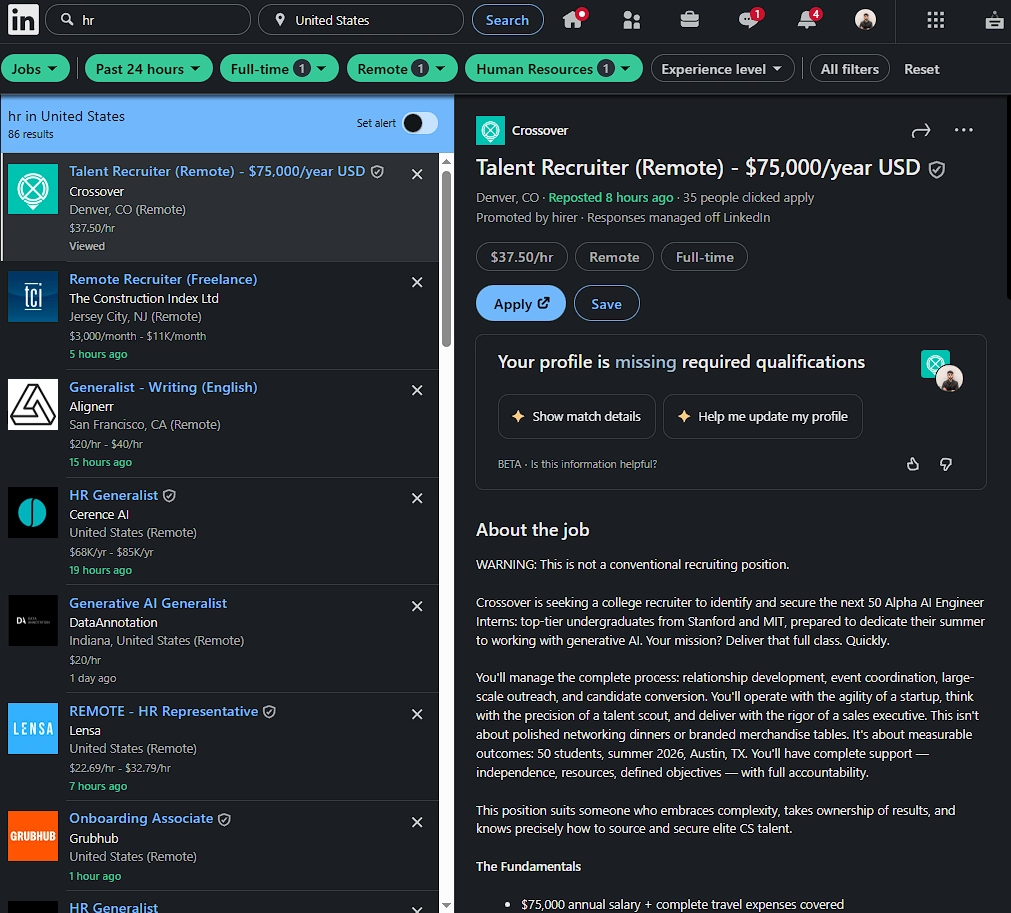
Once the results look right, copy the URL from your browser's address bar.
Ahora haz lo mismo con tu segunda variante de título. Mismos filtros, palabra clave diferente. Copia esa URL.
Repeat for all your variations.
Step 3: Save Each Search in LinkedIn Lists
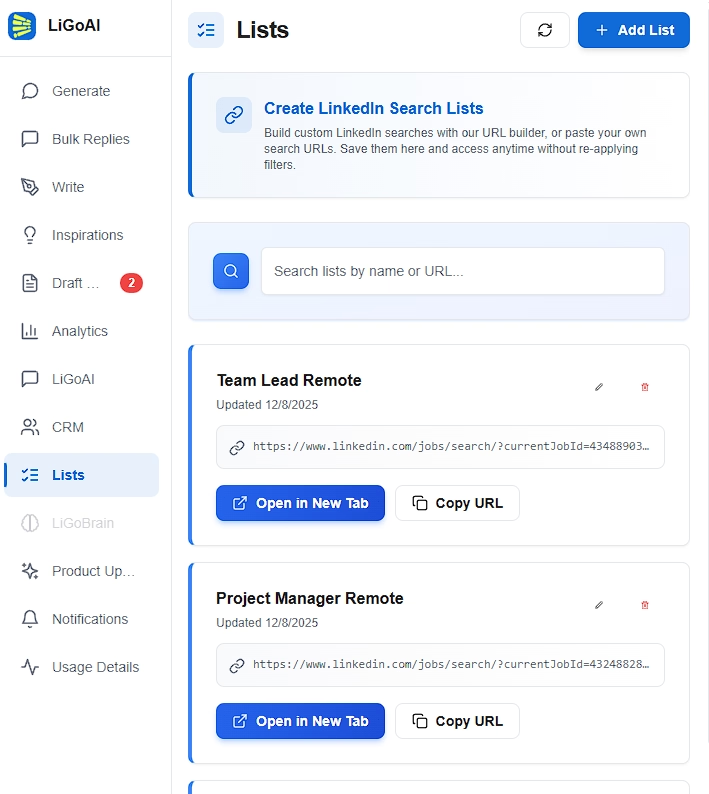
Abre el Extensión de LiGo para Chrome and go to the Lists tab.
Para cada URL que copiaste:
- Click "Add List"
- Select "Paste URL"
- Name it clearly (e.g., "Jobs - Frontend Developer" or "Jobs - UI Engineer")
- Pegar la URL
- Salvar
Haz esto para todas tus variaciones. Deberías acabar con 4-6 listas guardadas, una para cada variación de título.
Example: Frontend Developer Portfolio
Here's what a complete portfolio might look like for someone searching frontend roles:
| List Name | Keyword |
|---|---|
| Empleos - Desarrollador frontend | frontend developer |
| Empleos - Ingeniero frontend | frontend engineer |
| Jobs - UI Developer | UI developer |
| Empleos - Desarrollador React | react developer |
| Jobs - JavaScript Developer | Desarrollador de JavaScript |
Same location. Same experience level. Same other filters. Different keywords.
Five lists. Five clicks every morning. Complete coverage of the frontend job market.
The URL Hack: See Jobs Before Everyone Else
Esto es algo que la mayoría de la gente no sabe sobre la búsqueda de empleo en LinkedIn.
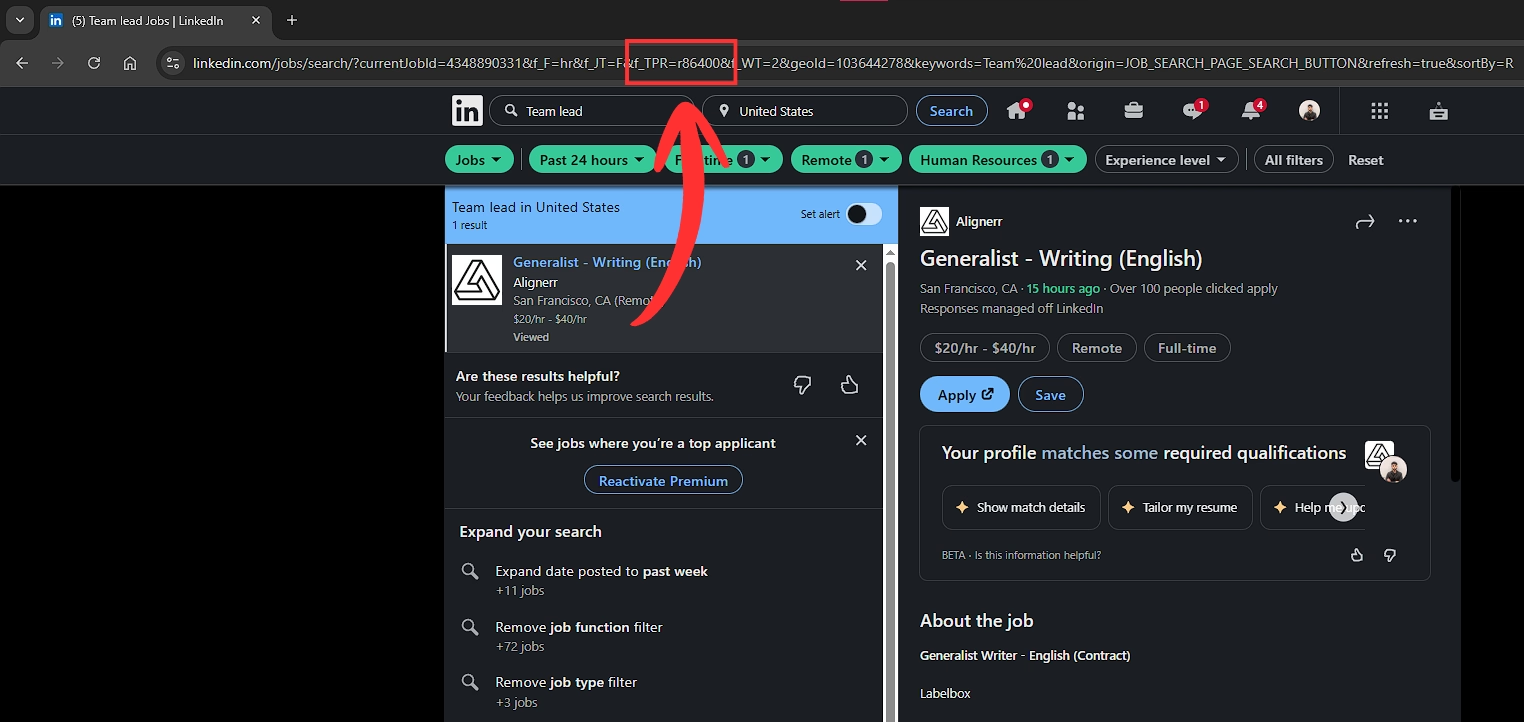
Cuando filtras por "Últimas 24 horas", LinkedIn añade un parámetro a la URL que controla la ventana temporal. Y ese parámetro se mide en segundos.
Lo que significa que puedes modificarla para que vean ofertas de empleo publicadas en la última hora. O los últimos 30 minutos. O cualquier plazo personalizado que quieras.
Por qué es importante:
Las solicitudes de empleo tienen una vida media. Las primeras 24 horas son críticas. Después de eso, la oferta tiene cientos de candidatos y tu currículum desaparece en un montón.
But if you can see a job 2 hours after it's posted - before LinkedIn even shows it to most people in the "Past 24 hours" filter - you're one of the first applicants. Your resume gets seen. Your odds go up dramatically.
Cómo funciona el parámetro URL
When you set LinkedIn's time filter to "Past 24 hours," your URL will contain something like this:
f_TPR=r86400
That 86400 is the number of seconds. 86,400 seconds = 24 hours.
Las matemáticas:
- 1 hour = 3,600 seconds
- 2 hours = 7,200 seconds
- 6 hours = 21,600 seconds
- 12 horas = 43.200 segundos
- 24 hours = 86,400 seconds
To see jobs posted in the last hour, you change the URL from:
https://www.linkedin.com/jobs/search/?f_TPR=r86400&keywords=product%20manager...
Para:
https://www.linkedin.com/jobs/search/?f_TPR=r3600&keywords=product%20manager...
That's it. Change r86400 to r3600. Now you're seeing jobs from the last 60 minutes only.
Step-by-Step: Creating a Custom Time Filter
- Haz tu búsqueda de empleo habitual en LinkedIn
- Set the time filter to "Past 24 hours" (this adds the time parameter to the URL)
- Copy the URL from your browser
- Find the f_TPR=r86400 part
- Change 86400 to your desired number of seconds
- Paste the modified URL back into your browser to test
- Guarda esta URL personalizada en LinkedIn Lists
My Recommended Time Windows
Para buscar trabajo activamente, recomiendo esto:
"Last 2 hours" (r7200)- Punto óptimo para capturar anuncios frescos varias veces al día
"Last 6 hours" (r21600) - Good for checking twice a day (morning and evening)
"Last hour" (r3600) - Aggressive mode if you're checking constantly
El número exacto depende de la frecuencia con la que estés dispuesto a comprobar. Pero cualquier cosa menos de 24 horas te pone por delante de la mayoría de los solicitantes.
Combining the Portfolio + URL Hack
Now let's put both strategies together.
You have your portfolio of 5 title variations. Instead of saving them with the default 24-hour filter, you save them with a custom time parameter.
Here's what your final setup looks like:
| List Name | Keyword | Time Parameter |
|---|---|---|
| Jobs - Frontend Developer (2hr) | frontend developer | r7200 |
| Jobs - Frontend Engineer (2hr) | frontend engineer | r7200 |
| Empleos - Desarrollador de UI (2 horas) | UI developer | r7200 |
| Empleos - Desarrollador React (2 horas) | react developer | r7200 |
| Jobs - JavaScript Developer (2hr) | Desarrollador de JavaScript | r7200 |
Five lists. Each one showing jobs posted in the last 2 hours. Each one covering a different title variation.
The Morning Routine
Here's how you use this:
- Open the LiGo extension
- Go to Lists
- Haz clic en tu primera lista de búsqueda de empleo - LinkedIn se abre con resultados frescos
- Busca roles interesantes, abre los prometedores en nuevas pestañas
- Volver a la extensión, haz clic en tu segunda lista
- Repeat for all 5 lists
Total time: 10-15 minutes.
What you've accomplished: swept the entire market for your target role, saw jobs that were posted in the last 2 hours, and you're among the first applicants.
Do this twice a day (morning and evening) and you're seeing jobs before they even show up in most people's "Past 24 hours" filter.
Por qué esta combinación es poderosa
La mayoría de los candidatos a empleo:
- Buscar un título
- Use the default 24-hour filter
- Check once a day
- Compite con cientos de solicitantes
You:
- Search five title variations
- See jobs within hours of posting
- Revisa varias veces al día sin ningún esfuerzo extra
- Compete with a handful of applicants
Same amount of work (thanks to saved lists). Completely different results.
Final Takeaway
Job hunting on LinkedIn doesn't have to be a daily grind of typing the same searches and scrolling through the same stale results.
The Portfolio Approach ensures you're seeing every version of your target role - not just the obvious keyword everyone else is searching.
The URL Hack ensures you're seeing jobs hours before most applicants even know they exist.
Combined with LinkedIn Lists in the LiGo Chrome Extension, guardas todas estas búsquedas una vez y accedes a ellas con un solo clic para siempre.
Here's your action plan:
- Brainstorm 4-6 title variations for your target role
- Create a LinkedIn job search for each variation
- Modify the URL to use a shorter time window (r7200 for 2 hours is a good start)
- Save each modified URL in LinkedIn Lists
- Revisa todas tus listas cada mañana (y por la noche si vas en serio)
The job market is competitive. But most people are competing inefficiently - searching one keyword, checking once a day, applying to crowded listings.
You don't have to play that game.
Build your portfolio. Hack your time window. Be first.
Próximos recursos
More guides to level up your LinkedIn strategy:
- Fix Your LinkedIn Feed: A Saved Search Strategy That Works - Full documentation on saved searches and the Lists feature
- LiGo Chrome Extension Features- Todo lo que puede hacer la extensión
- Cómo optimizar tu perfil de LinkedIn para la búsqueda de empleo - Make sure your profile converts when recruiters click
- Lista de verificación del perfil de LinkedIn 2025 - Complete optimization guide
- LinkedIn para autónomos: encontrar clientes y construir autoridad - If you're searching for clients, not jobs
LinkedIn Lists is available now in the LiGo Chrome Extension. Start building your job search portfolio today.